
Director’s Toolbox
Director's Toolbox is a high visibility monthly email that provides Lowe's directors with a snapshot of events, priorities and updates for the upcoming month.
Tools Used
Director’s Toolbox
Director's Toolbox is a high visibility monthly email that provides Lowe's directors with a snapshot of events, priorities and updates for the upcoming month.
Tools Used
Product Overview
The Director’s Toolbox email is a monthly communication designed for Directors and Sr. Directors across all verticals. Originally intended to share key dates and updates, the format had become cluttered, repetitive, and difficult to navigate. Engagement was low, and the lack of hierarchy made it hard for leaders to quickly identify what mattered most.
The redesign aimed to make the email more actionable, skimmable, and aligned with leadership priorities. This required a full content restructure and the introduction of a clear visual hierarchy. Collaboration with Internal Communications and Salesforce teams was essential to ensure technical feasibility and alignment with broader communication goals.
Aug. 2025 - Oct. 2025
Internal Communications
Product Designer
The Problem
Emails were used to share key dates and updates, but were the least preferred channel.
Content was dense and repetitive.
Lack of hierarchy made it difficult to scan or prioritize.
Leadership expressed a need for a centralized hub for planning and cross vertical visibility.
User Goals
Quickly identify what’s due, what’s upcoming, and what needs planning.
Access relevant links and resources with ease.
Feel recognized and supported in their strategic role.
Business Goals
Quickly identify what’s due, what’s upcoming, and what needs planning.
Access relevant links and resources with ease.
Feel recognized and supported in their strategic role.
Design Process
Exploration
We began by mapping the existing content structure and identifying key pain points. This included analyzing how information was grouped, how dates were surfaced, and how links were embedded. The goal was to improve readability, reduce redundancy, and elevate strategic relevance.
We also reviewed feedback from Directors and Sr. Directors to understand their expectations and frustrations.
Iteration
We restructured the email into three clear sections:
Due - Immediate deadlines
Plan Ahead - Upcoming initiatives
Mark Calendar - Events
Each section was limited to 3–5 items, presented as bulleted summaries with embedded links for quick access. A teaser tile for the Directors-only Forum was added to encourage engagement, and a navigation bar was introduced to improve scannability and orientation.
Design decisions were guided by UX principles, stakeholder feedback, and the technical constraints of Salesforce. We prioritized clarity, consistency, and ease of use.
Final Design
A clear visual hierarchy that surfaces dates and priorities first
Streamlined layout with bulleted summaries and embedded links
A teaser tile for the Forum to drive engagement
Navigation bar for quick orientation and section jumping
The final format supports fast scanning, strategic planning, and cross vertical awareness, all within the constraints of Salesforce’s email tools.
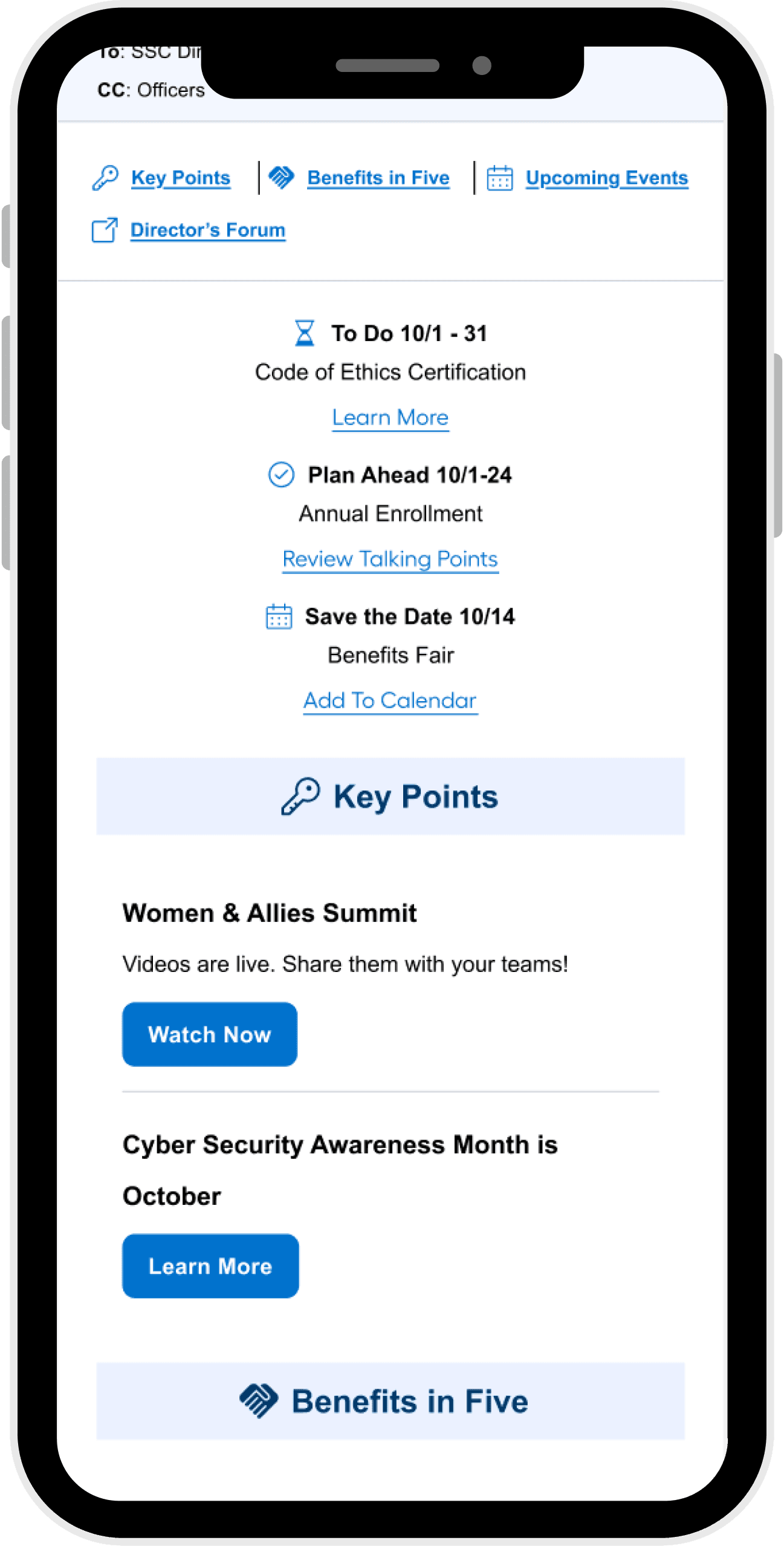
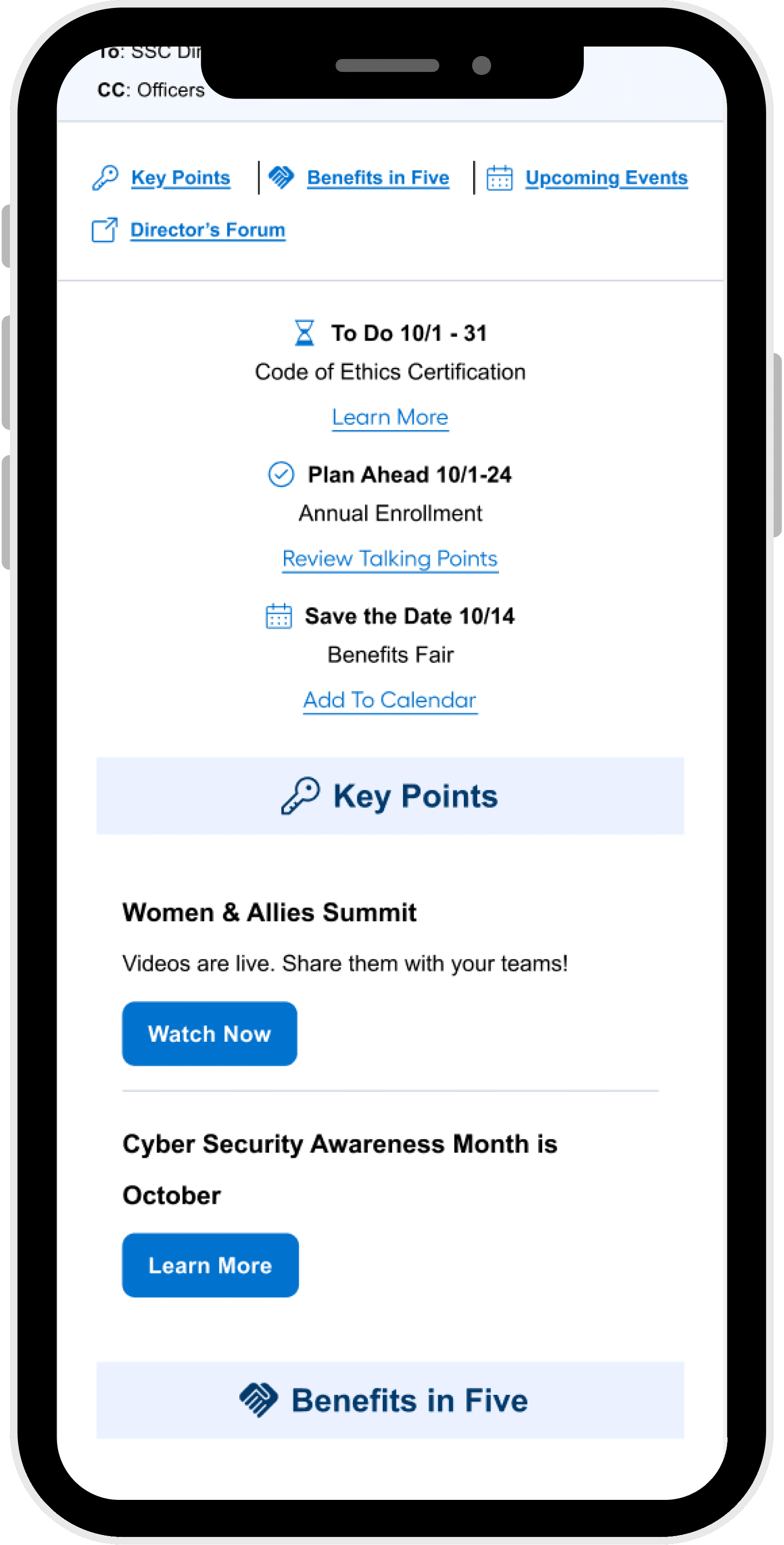
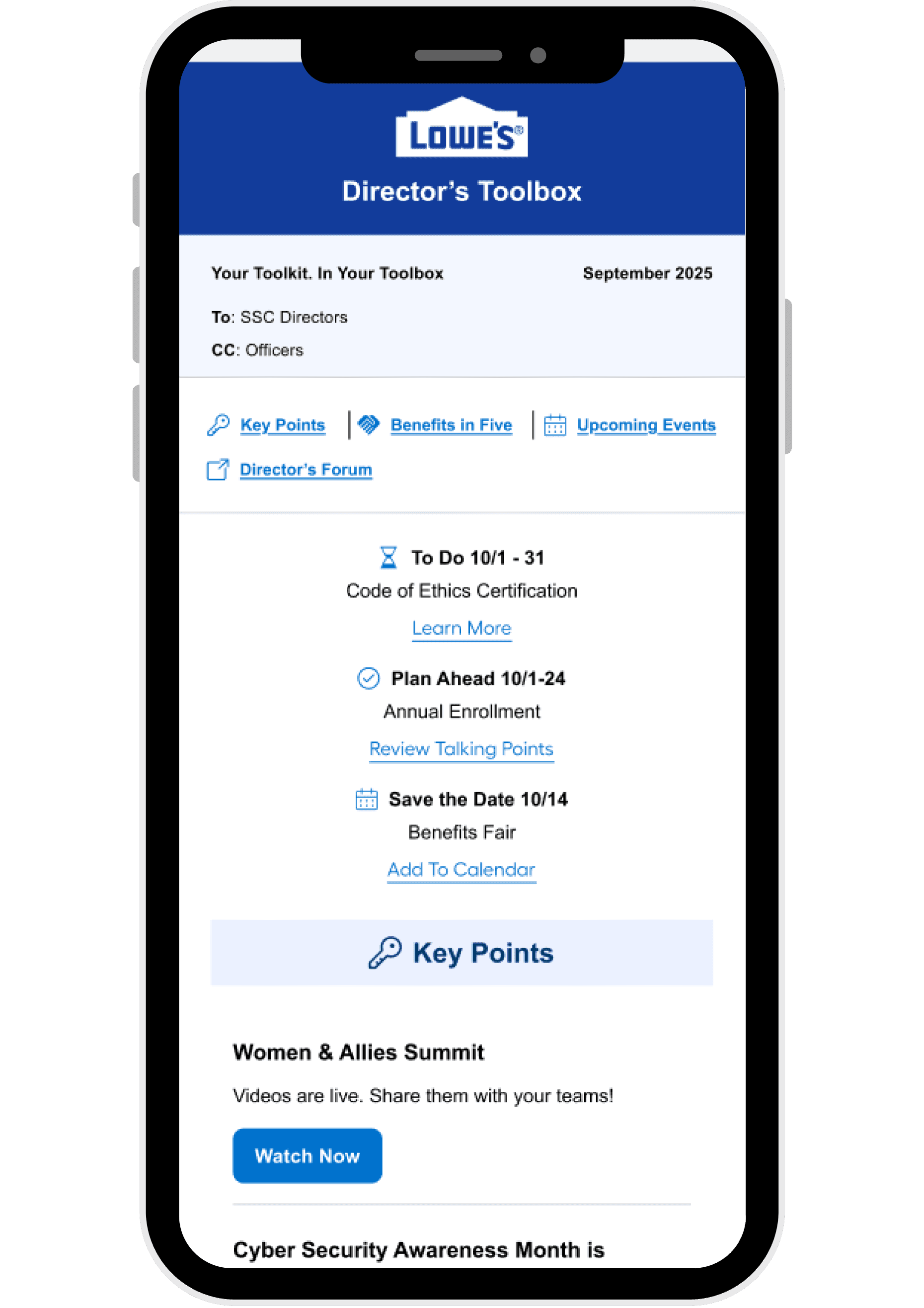
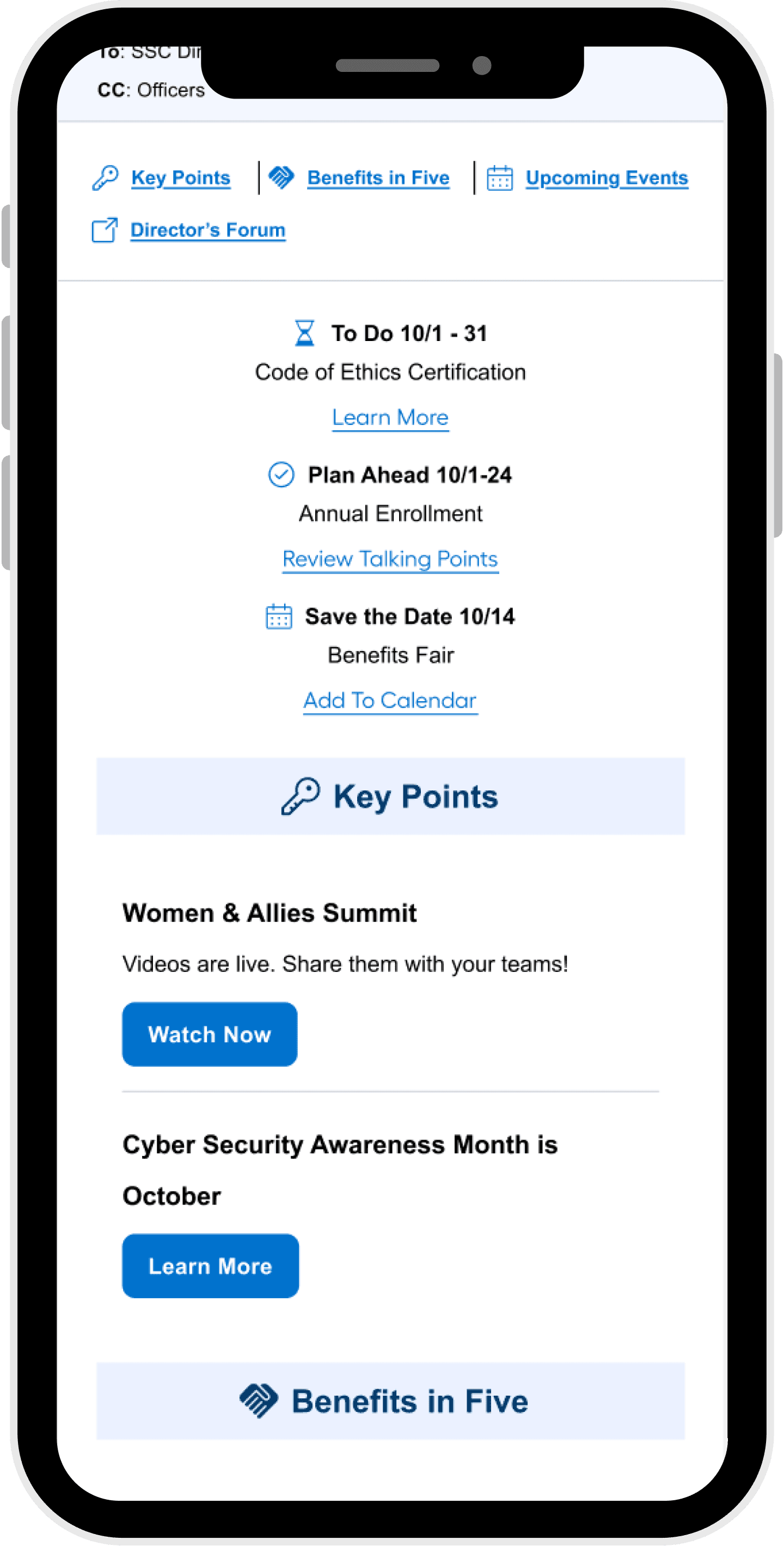
This screen introduces the monthly Director’s Toolbox in a mobile-friendly format. The layout prioritizes clarity and hierarchy, surfacing key actions like “To Do,” “Plan Ahead,” and “Save the Date” with embedded links and calendar integration. The top navigation bar allows quick access to the dDirector’s Forum
The design supports fast scanning and immediate action taking, tailored to the needs of SSC Directors and Officers.
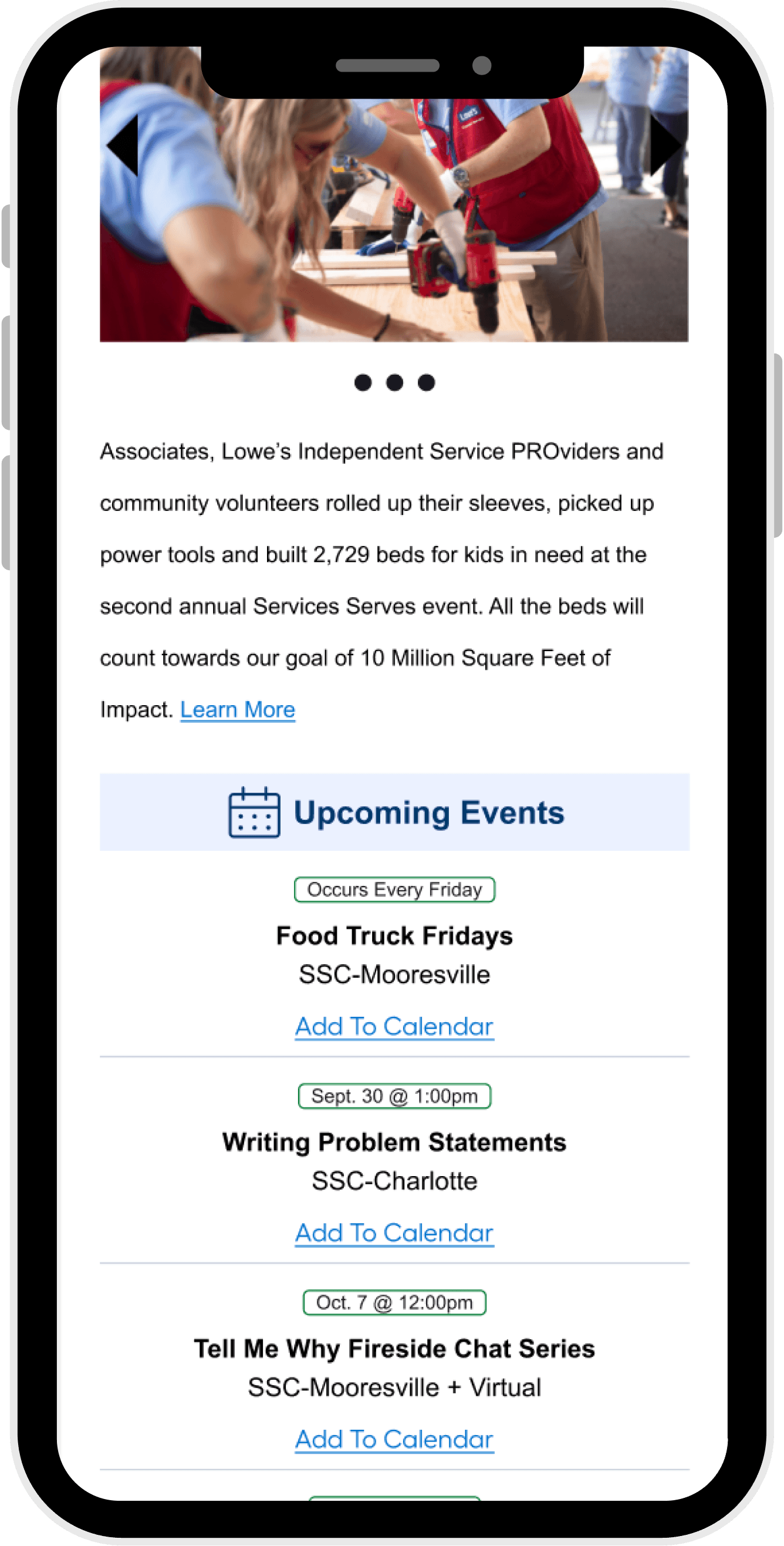
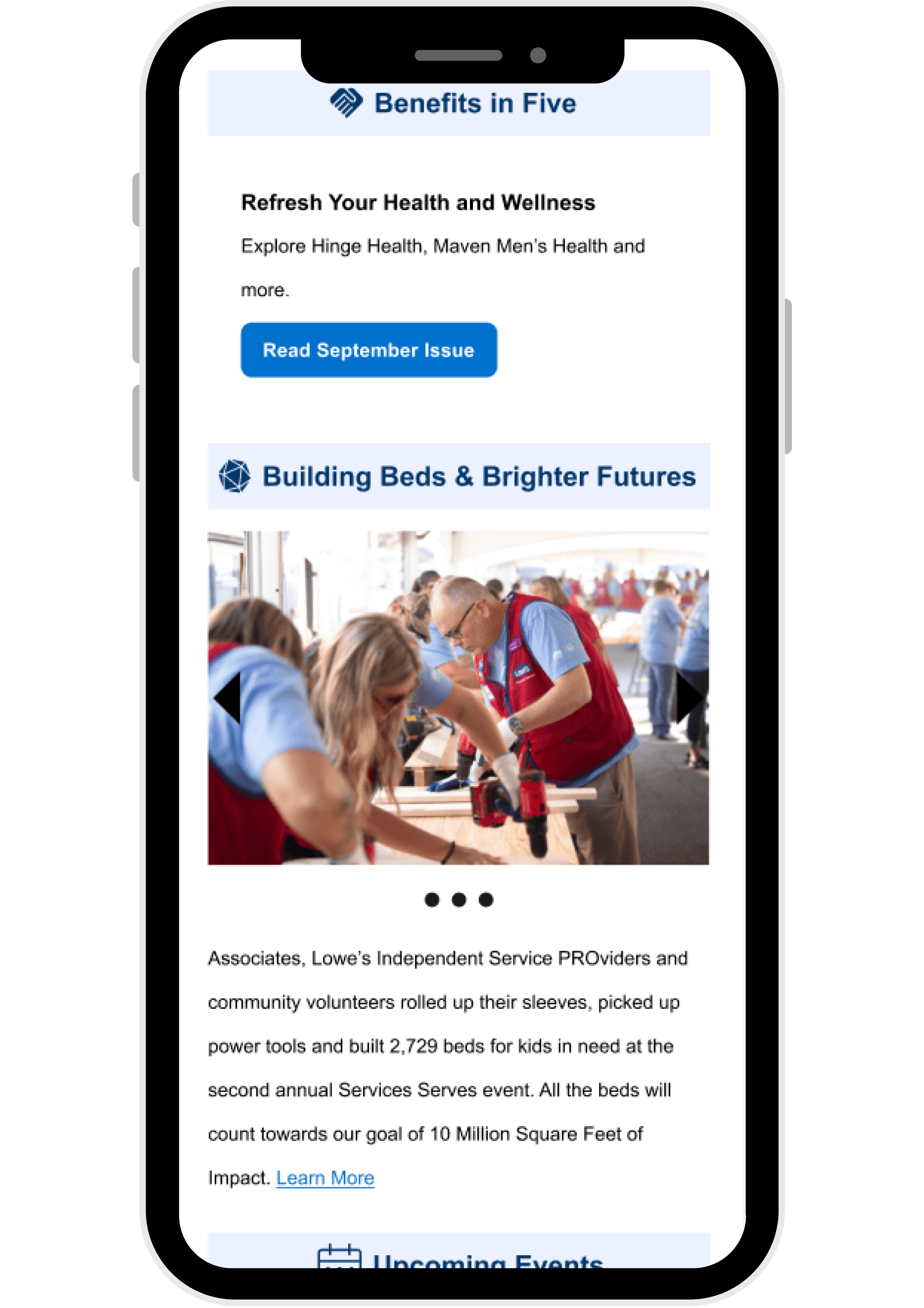
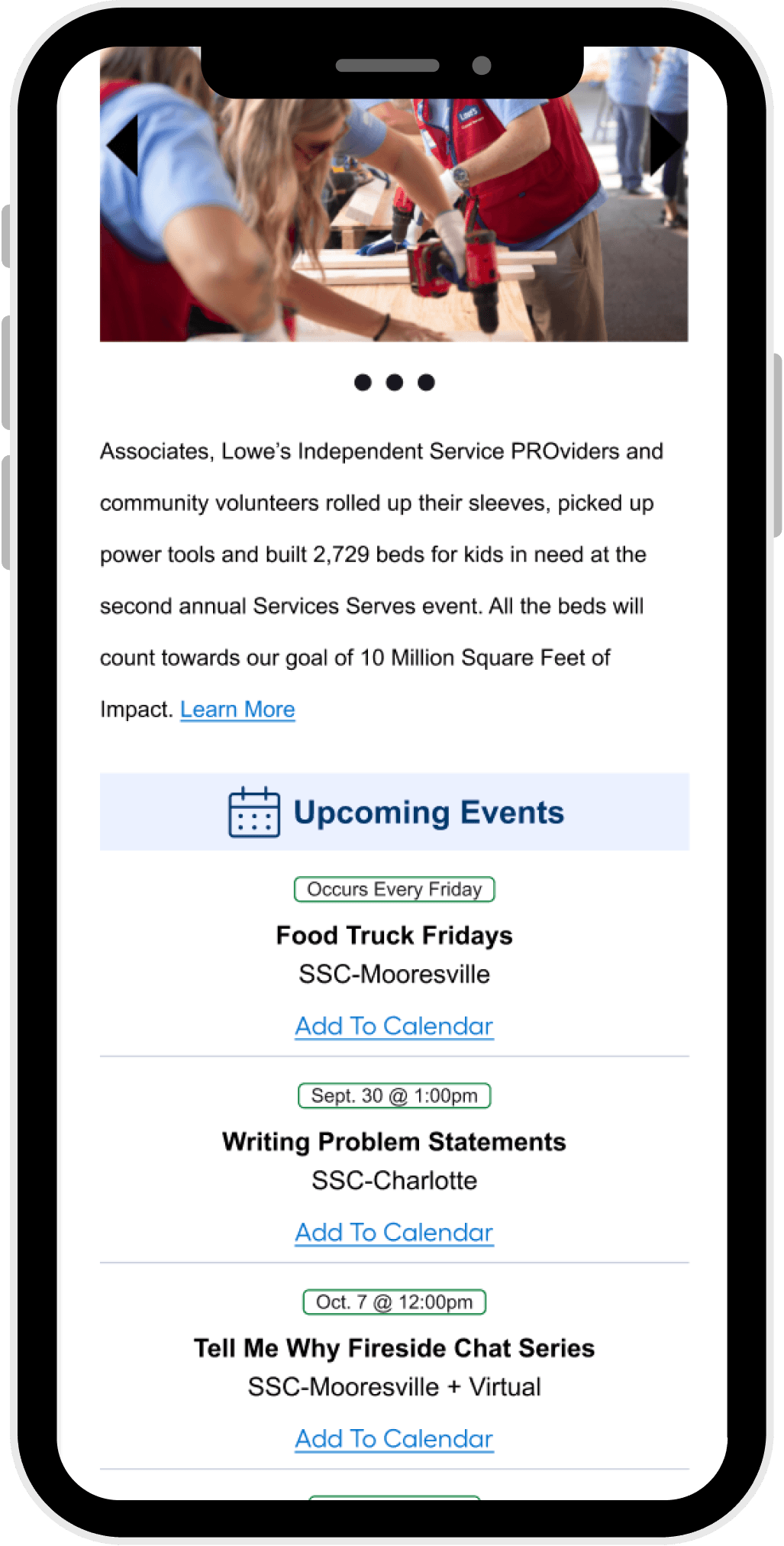
This screen highlights wellness resources and community impact stories under the “Benefits in Five” section. Each card includes a concise headline, supporting summary, and a clear call-to-action. The layout uses visual hierarchy and iconography to distinguish between HR content and community initiatives.
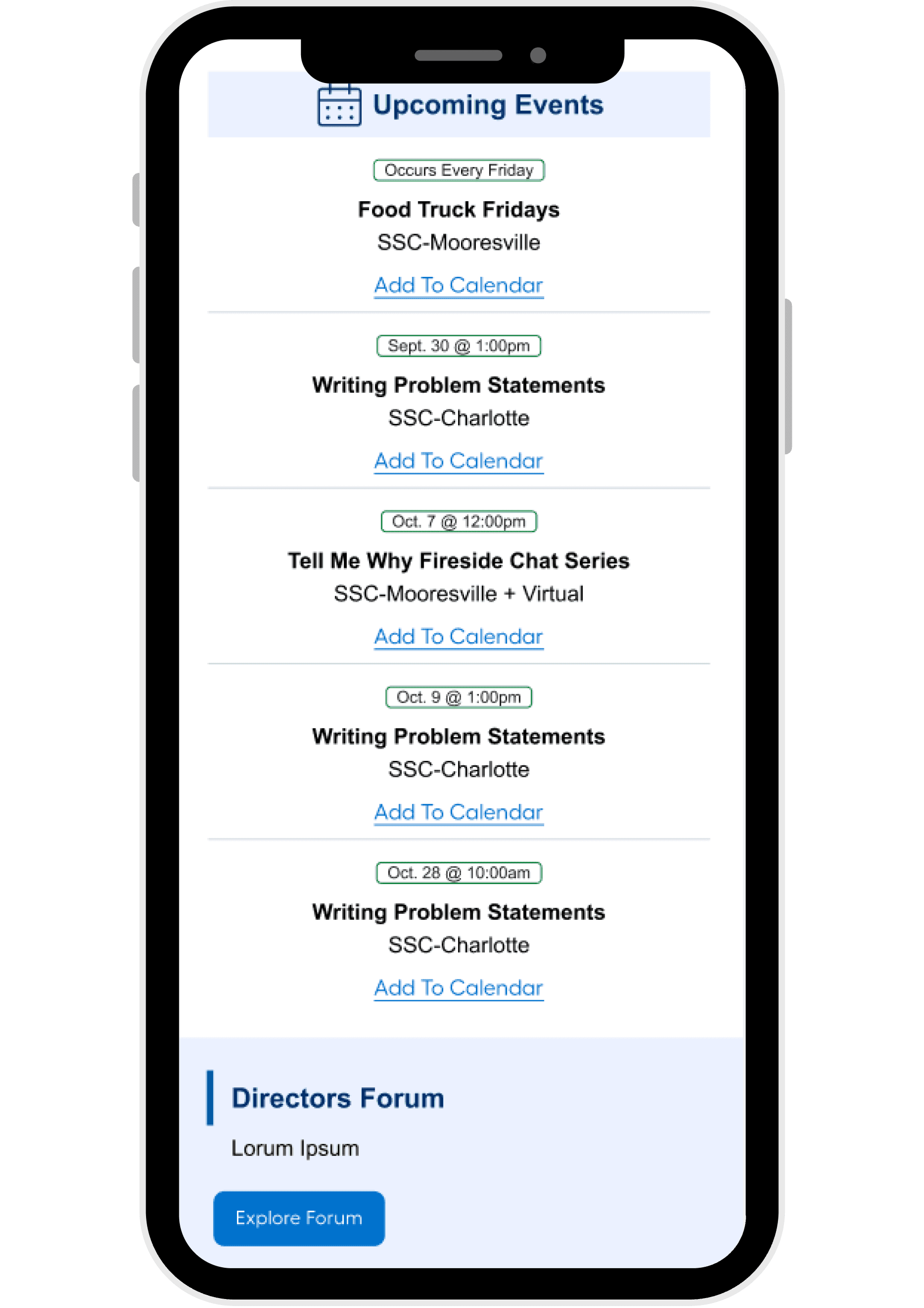
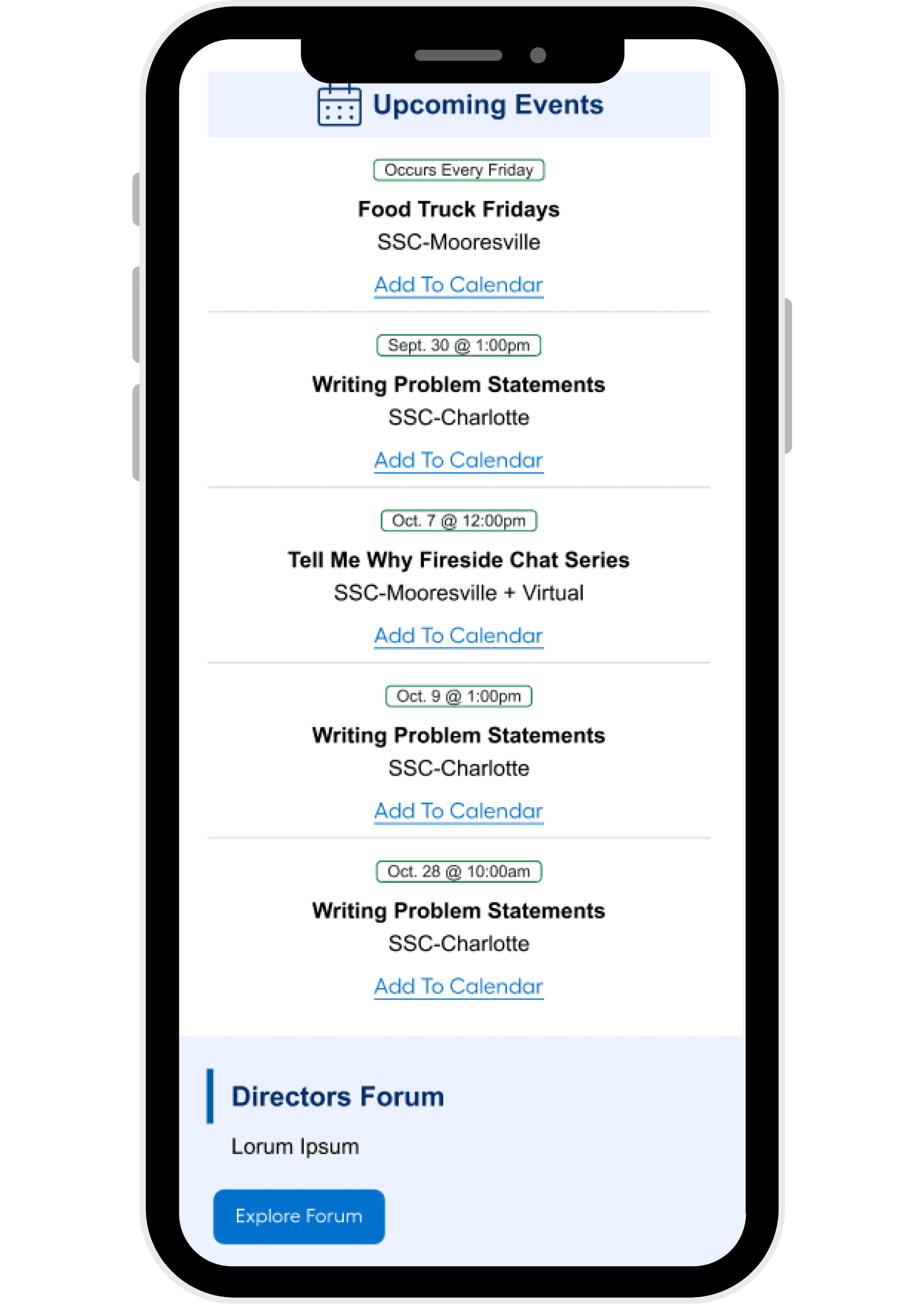
This screen shows upcoming events with location, time, and calendar integration. Events are grouped by date and formatted for quick readability, supporting both in-person and virtual participation.
The bottom module introduces the Directors Forum, a direct link to the main source of information.
Reflections
This redesign underscored the importance of cross functional collaboration. Working within Salesforce’s limitations required creative problem solving and close alignment with Internal Communications.
The process also highlighted how small structural changes, like grouping by urgency or adding a teaser tile can significantly improve engagement and usability.
Next Steps
Continue A/B testing email layouts and cadence.
Expand Forum content types and personalization.
Look at performance metrics when they come out to see what comes next.
Product Overview
The Director’s Toolbox email is a monthly communication designed for Directors and Sr. Directors across all verticals. Originally intended to share key dates and updates, the format had become cluttered, repetitive, and difficult to navigate. Engagement was low, and the lack of hierarchy made it hard for leaders to quickly identify what mattered most.
The redesign aimed to make the email more actionable, skimmable, and aligned with leadership priorities. This required a full content restructure and the introduction of a clear visual hierarchy. Collaboration with Internal Communications and Salesforce teams was essential to ensure technical feasibility and alignment with broader communication goals.
Aug. 2025 - Oct. 2025
Internal Communications
Product Designer
The Problem
Emails were used to share key dates and updates, but were the least preferred channel.
Content was dense and repetitive.
Lack of hierarchy made it difficult to scan or prioritize.
Leadership expressed a need for a centralized hub for planning and cross vertical visibility.
User Goals
Quickly identify what’s due, what’s upcoming, and what needs planning.
Access relevant links and resources with ease.
Feel recognized and supported in their strategic role.
Business Goals
Quickly identify what’s due, what’s upcoming, and what needs planning.
Access relevant links and resources with ease.
Feel recognized and supported in their strategic role.
Design Process
Exploration
We began by mapping the existing content structure and identifying key pain points. This included analyzing how information was grouped, how dates were surfaced, and how links were embedded. The goal was to improve readability, reduce redundancy, and elevate strategic relevance.
We also reviewed feedback from Directors and Sr. Directors to understand their expectations and frustrations.
Iteration
We restructured the email into three clear sections:
Due - Immediate deadlines
Plan Ahead - Upcoming initiatives
Mark Calendar - Events
Each section was limited to 3–5 items, presented as bulleted summaries with embedded links for quick access. A teaser tile for the Directors-only Forum was added to encourage engagement, and a navigation bar was introduced to improve scannability and orientation.
Design decisions were guided by UX principles, stakeholder feedback, and the technical constraints of Salesforce. We prioritized clarity, consistency, and ease of use.
Final Design
A clear visual hierarchy that surfaces dates and priorities first
Streamlined layout with bulleted summaries and embedded links
A teaser tile for the Forum to drive engagement
Navigation bar for quick orientation and section jumping
The final format supports fast scanning, strategic planning, and cross vertical awareness, all within the constraints of Salesforce’s email tools.
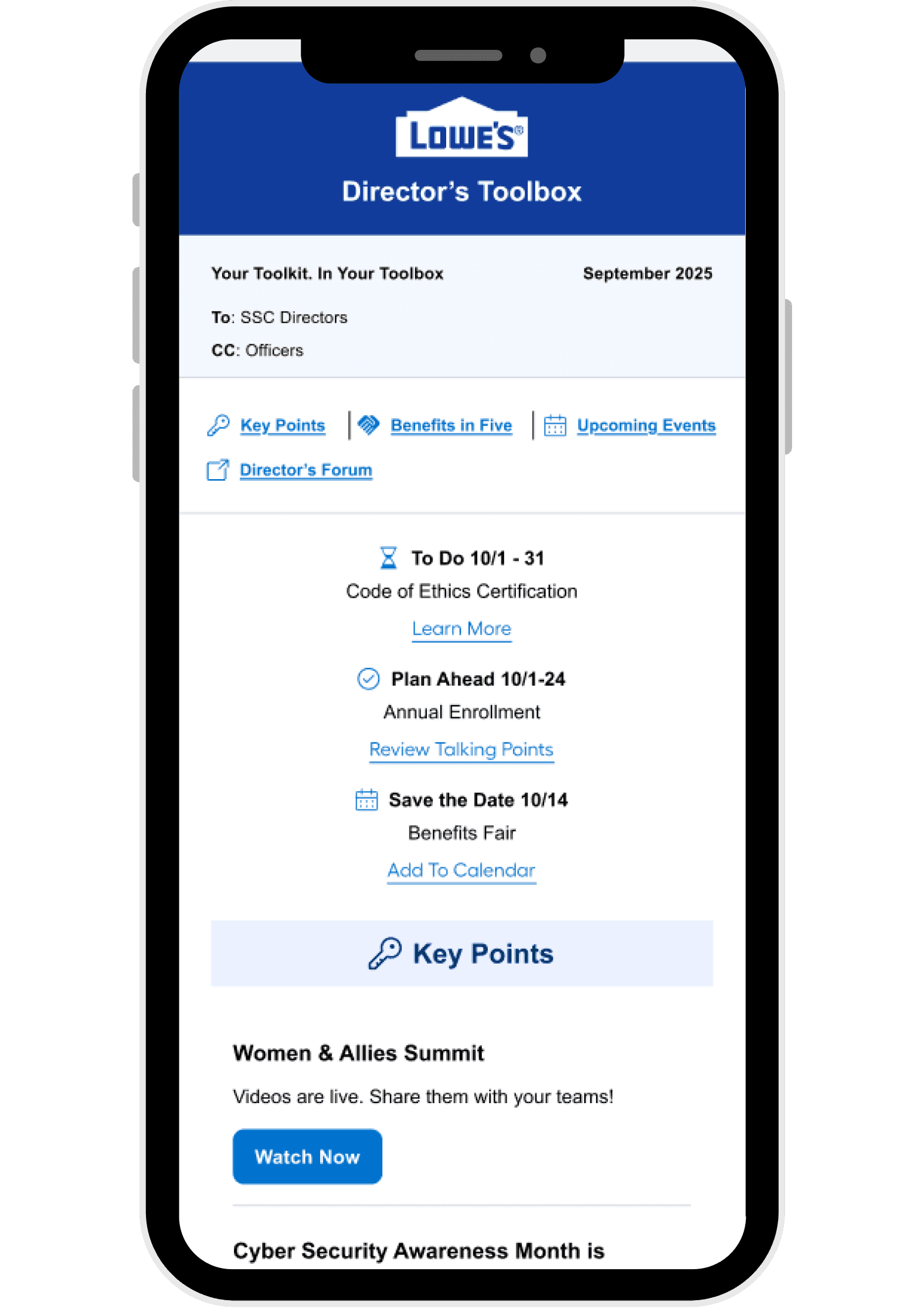
This screen introduces the monthly Director’s Toolbox in a mobile-friendly format. The layout prioritizes clarity and hierarchy, surfacing key actions like “To Do,” “Plan Ahead,” and “Save the Date” with embedded links and calendar integration. The top navigation bar allows quick access to strategic content areas such as Key Points, Benefits in Five, and Upcoming Events.
The design supports fast scanning and immediate action-taking, tailored to the needs of SSC Directors and Officers.
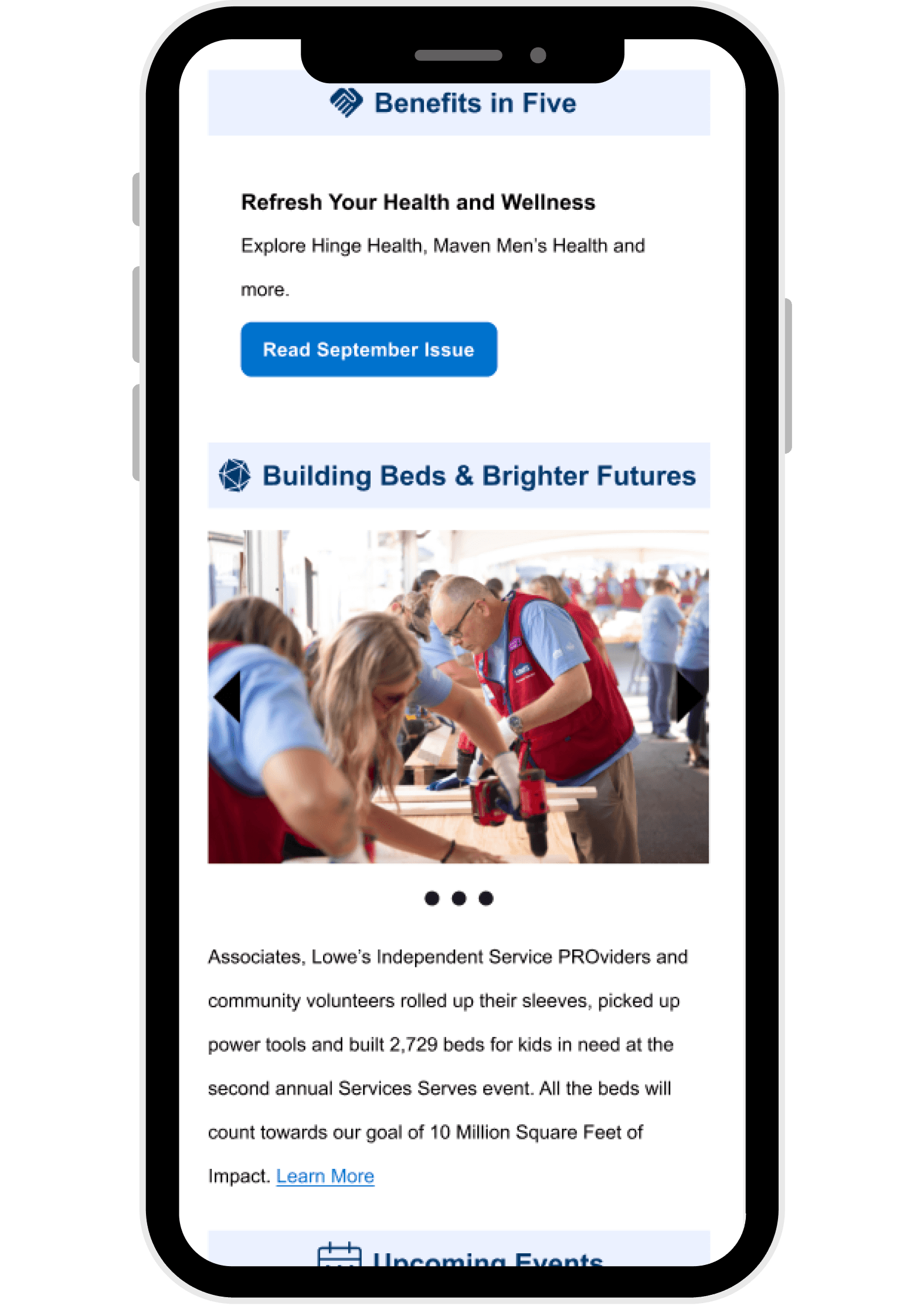
This screen highlights wellness resources and community impact stories under the “Benefits in Five” section. Each card includes a concise headline, supporting summary, and a clear call-to-action. The layout uses visual hierarchy and iconography to distinguish between HR content and community initiatives.
This screen introduces the monthly Director’s Toolbox in a mobile-friendly format. The layout prioritizes clarity and hierarchy, surfacing key actions like “To Do,” “Plan Ahead,” and “Save the Date” with embedded links and calendar integration. The top navigation bar allows quick access to strategic content areas such as Key Points, Benefits in Five, and Upcoming Events.
The design supports fast scanning and immediate action taking, tailored to the needs of SSC Directors and Officers.
Reflections
This redesign underscored the importance of cross functional collaboration. Working within Salesforce’s limitations required creative problem solving and close alignment with Internal Communications.
The process also highlighted how small structural changes, like grouping by urgency or adding a teaser tile can significantly improve engagement and usability.
Next Steps
Continue A/B testing email layouts and cadence.
Expand Forum content types and personalization.
Look at performance metrics when they come out to see what -comes next.
Director’s Toolbox
Director's Toolbox is a high visibility monthly email that provides Lowe's directors with a snapshot of events, priorities and updates for the upcoming month.
Tools Used
Product Overview
The Director’s Toolbox email is a monthly communication designed for Directors and Sr. Directors across all verticals. Originally intended to share key dates and updates, the format had become cluttered, repetitive, and difficult to navigate. Engagement was low, and the lack of hierarchy made it hard for leaders to quickly identify what mattered most.
The redesign aimed to make the email more actionable, skimmable, and aligned with leadership priorities. This required a full content restructure and the introduction of a clear visual hierarchy. Collaboration with Internal Communications and Salesforce teams was essential to ensure technical feasibility and alignment with broader communication goals.
Aug. 2025 - Oct. 2025
Internal Communications
Product Designer
The Problem
Emails were used to share key dates and updates, but were the least preferred channel.
Content was dense and repetitive.
Lack of hierarchy made it difficult to scan or prioritize.
Leadership expressed a need for a centralized hub for planning and cross vertical visibility.
User Goals
Quickly identify what’s due, what’s upcoming, and what needs planning.
Access relevant links and resources with ease.
Feel recognized and supported in their strategic role.
Business Goals
Quickly identify what’s due, what’s upcoming, and what needs planning.
Access relevant links and resources with ease.
Feel recognized and supported in their strategic role.
Design Process
Exploration
We began by mapping the existing content structure and identifying key pain points. This included analyzing how information was grouped, how dates were surfaced, and how links were embedded. The goal was to improve readability, reduce redundancy, and elevate strategic relevance.
We also reviewed feedback from Directors and Sr. Directors to understand their expectations and frustrations.
Iteration
We restructured the email into three clear sections:
Due - Immediate deadlines
Plan Ahead - Upcoming initiatives
Mark Calendar - Events
Each section was limited to 3–5 items, presented as bulleted summaries with embedded links for quick access. A teaser tile for the Directors-only Forum was added to encourage engagement, and a navigation bar was introduced to improve scannability and orientation.
Design decisions were guided by UX principles, stakeholder feedback, and the technical constraints of Salesforce. We prioritized clarity, consistency, and ease of use.
Final Design
A clear visual hierarchy that surfaces dates and priorities first
Streamlined layout with bulleted summaries and embedded links
A teaser tile for the Forum to drive engagement
Navigation bar for quick orientation and section jumping
The final format supports fast scanning, strategic planning, and cross vertical awareness, all within the constraints of Salesforce’s email tools.
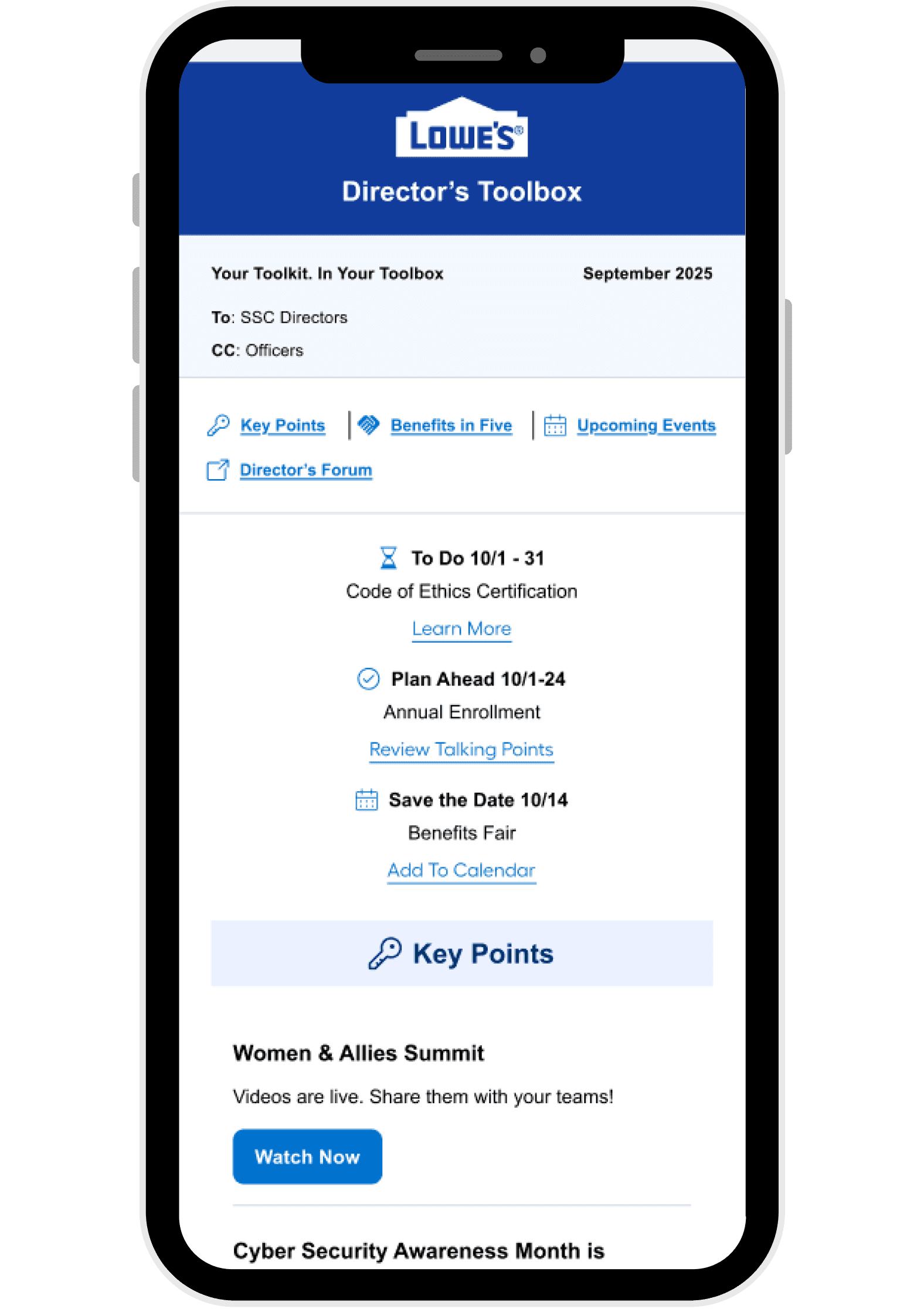
This screen introduces the monthly Director’s Toolbox in a mobile-friendly format. The layout prioritizes clarity and hierarchy, surfacing key actions like “To Do,” “Plan Ahead,” and “Save the Date” with embedded links and calendar integration. The top navigation bar allows quick access to strategic content areas such as Key Points, Benefits in Five, and Upcoming Events.
The design supports fast scanning and immediate action-taking, tailored to the needs of SSC Directors and Officers.
This screen highlights wellness resources and community impact stories under the “Benefits in Five” section. Each card includes a concise headline, supporting summary, and a clear call-to-action. The layout uses visual hierarchy and iconography to distinguish between HR content and community initiatives.
This screen introduces the monthly Director’s Toolbox in a mobile-friendly format. The layout prioritizes clarity and hierarchy, surfacing key actions like “To Do,” “Plan Ahead,” and “Save the Date” with embedded links and calendar integration. The top navigation bar allows quick access to strategic content areas such as Key Points, Benefits in Five, and Upcoming Events.
The design supports fast scanning and immediate action-taking, tailored to the needs of SSC Directors and Officers.
Reflections
This redesign underscored the importance of cross functional collaboration. Working within Salesforce’s limitations required creative problem solving and close alignment with Internal Communications.
The process also highlighted how small structural changes, like grouping by urgency or adding a teaser tile can significantly improve engagement and usability.
Next Steps
Continue A/B testing email layouts and cadence.
Expand Forum content types and personalization.
Look at performance metrics when they come out to see what comes next.
Cameron McKalvey